



Blog
What Is a Wireframe and Why Does It Matter in Web Design?
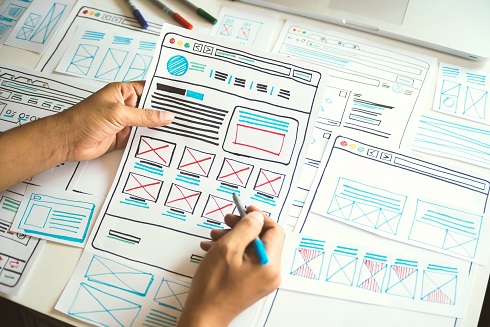
When it comes to designing a website, creating a wireframe is one of the most fundamental steps in the process. Whether you're building a simple blog or a complex e-commerce site, wireframing lays the groundwork for a successful user experience (UX). But what exactly is a wireframe? How does it function in website development? And why should you care about it? By the end of this article, you’ll not only understand the concept of wireframes but also how they shape exceptional website and app design.
What Is a Wireframe?
A wireframe is a simplified layout or blueprint of a webpage or application. It is used in the early stages of design to plan the structure, functionality, and user flow before visual or technical elements are added. Think of it as an architectural plan, but for websites.
Wireframes generally include:
- Placement of text and images (but not the actual content or photos themselves)
- Structure of navigation bars, buttons, icons, and other interactive elements
- Content hierarchy, helping designers prioritize placement of content
- Call-to-actions and where they will appear on the page
Wireframes focus on "what goes where" rather than "what it looks like," which enables teams to perfect usability and navigation before investing time in detailed design work.
Wireframes are often presented in black-and-white, sometimes with basic placeholders (like blank boxes and labeled areas) for simplicity.
Why Are Wireframes Important?
Wireframes are essential to the web design process because they help:
- Simplify Communication: By visually representing the website layout, wireframes make it easy for designers, developers, and clients to stay on the same page.
- Improve UX Design: Thinking through user interaction early helps eliminate pain points and create intuitive experiences.
- Save Time and Money: A mistake fixed during wireframing is faster and cheaper than fixing it later in development or production.
- Guide Design Decisions: With the structure already defined, designers can focus on aesthetics without worrying about layout or functionality.
Wireframing isn’t just a nice-to-have; it’s a need-to-have if you want a seamless, high-performing website.
Types of Wireframes

Wireframes can vary in levels of detail depending on the complexity of the project and the team’s preferences. Here are the three main types:
Low-Fidelity Wireframes
These are very basic sketches or outlines. Usually done on paper or with simple tools, low-fidelity wireframes serve to quickly map out the arrangement of elements and test basic user flows. They are the starting point of the wireframing process.
Mid-Fidelity Wireframes
These include more detailed layouts with placeholders for images and text. Mid-fidelity wireframes make it easier to see how different content blocks, navigation elements, and CTAs will work together.
High-Fidelity Wireframes
These are near-final drafts created using advanced tools. This type of wireframe includes placeholder text, detailed notes, and actionable elements to closely mimic the website’s actual look and functionality, without fully styled aesthetics.
Wireframing in UX Design
Wireframing plays a pivotal role in UX design. It helps ensure your website isn't just visually appealing, but easy to use as well. Usability tests can be performed on wireframes to gather real feedback from potential users without the distraction of colors, imagery, or fonts.
For example, wireframes allow UX designers to determine:
- How users move across the website
- The effectiveness of CTAs (Call-to-Actions)
- Whether content placement improves clarity and engagement
With wireframing, UX designers can refine every detail of the user’s interaction before development starts, saving tremendous time and resources.
Real-Life Wireframe Examples
Here is an example from a project we've done:
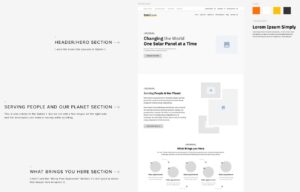
A typical wireframe will often look like this one. Aspects such as filler text, a color palette, a set typography, and basic shapes for visual elements are common. One of our designers also included notes about the wireframe and what certain sections are and what their purpose is.
How to Create a Website Wireframe
 Want to create your own wireframe? Here’s a step-by-step guide:
- Define Your Goals
What’s the purpose of the website? Who is the target audience? These questions will shape how the content is structured.
- Gather Inspiration
Look at competitor websites, wireframe examples, or your favorite pages for ideas. Tools like Dribbble or Behance are great for inspiration.
- Map Out User Flows
Outline how a user will interact with your website. For instance, when they land on your home page, where should they click next?
- Sketch the Layout
Start with low-fidelity sketches on paper or tools like Balsamiq. This is where you begin placing navigation bars, image placeholders, and CTAs.
- Choose Your Tool
Use tools like Figma, Adobe XD, or Sketch to create mid- or high-fidelity wireframes.
- Test and Iterate
Share your wireframe with colleagues, potential users, or UX designers. Their feedback helps identify improvements before full development starts.
FAQs About Wireframes
What is the goal of wireframing in UX?
Wireframing is crucial in UX because it allows designers to focus on structure, navigation, and usability issues before investing in visual and technical details.
What is the best tool for wireframing?
Popular tools include Figma, Adobe XD, Sketch, and Balsamiq. Each offers features that cater to different levels of fidelity and collaboration needs.
Can I skip wireframing and go straight to design?
Skipping wireframing may seem tempting but can lead to costly design errors. Taking time for wireframing ensures a smoother design and development process.
What does a website wireframe include?
Wireframes typically include placeholders for text and images, navigation menus, buttons, and CTAs. They map out where essential elements go on the page.
Wireframing is not just a step in the design process; it’s the blueprint of a successful website. By mapping out layouts, organizing content, and prioritizing user flow, wireframes lay the groundwork for a website that’s functional, intuitive, and impactful.
At eSEOspace, we specialize in creating traffic-generating websites that excel in UI/UX design. With over 1,865 websites launched and 50,000 Page 1 Google keyword rankings for our clients, we’re committed to turning brands into online leaders.
Are you ready to create a website that’s as beautiful as it is functional? Call us today at (916) 866-7893 or contact us to get started!
Get a FREE Audit
We'll perform a comprehensive SEO, AEO, GEO & CRO audit of your website — completely free — and show you exactly how to outrank your competitors.
Don't have a site yet? Get in touch →
Make Your Website Competitive.
Leverage our expertise in Website Design + SEO Marketing, and spend your time doing what you love to do!








