



Blog
The Future of Backups: Plugins With Their Own Free Cloud Storage
Key Takeaways
- Backups protect WordPress sites from broken plugin updates, server failures, malware, and simple human mistakes that can permanently delete content.
- SEO work like redirects, database cleanups, and schema changes can break sites, so professionals back up before major technical changes.
- Traditional backups create files locally then rely on third-party services like Google Drive or Dropbox, adding accounts, subscriptions, and management overhead.
- A newer approach integrates dedicated backup storage directly into the plugin's own ecosystem, keeping the workflow simple as websites grow more complex.
- Backup Migration's BackupBliss offers 1GB of free native cloud storage, the first WordPress backup plugin to include its own free storage tier.
Why Backups Matter More Than Ever
Backups have always been one of those things WordPress users know they should take seriously, yet they are often pushed aside until something actually goes wrong. It usually starts with something small: a plugin update that unexpectedly breaks the site, a server issue that causes files to disappear, or malware quietly finding its way into the installation before anyone notices. Sometimes the problem is not even technical at all. A simple human mistake can be enough to remove important content permanently. Whatever the reason may be, the situation tends to become stressful very quickly once there is no reliable backup available.
SEO work itself can also create situations where backups become incredibly important. Major optimization changes, plugin replacements, redirects, database cleanups, schema modifications, or technical SEO adjustments can occasionally conflict with themes, plugins, or existing website configurations. Even experienced SEO professionals usually create backups before implementing larger technical changes because restoring a healthy version of the website is often far easier than troubleshooting a broken one afterward.
This is exactly why backup plugins became such an important part of the WordPress ecosystem over the years. Most website owners today understand that having backups is not optional anymore, especially for business websites, WooCommerce stores, membership platforms, or client projects where downtime can immediately affect traffic, rankings, leads, and revenue.
Why Traditional Backup Systems Are Starting to Change
For years, most WordPress backup solutions followed a fairly similar structure. The plugin would create backup files locally and then connect those files to third-party storage for backup, such as Google Drive or Dropbox, for off-site storage.
That approach still works perfectly well and remains widely used across the WordPress industry. However, it also means relying on several separate systems at once. Users need additional accounts, storage subscriptions, API connections, permissions, and ongoing management between different platforms.
For advanced users this may not sound particularly difficult, but for many website owners it introduces extra complexity into something that ideally should remain simple and dependable.
At the same time, website owners today are managing far more than simple blogs. SEO campaigns, analytics integrations, ecommerce platforms, staging environments, page builders, and marketing automation tools all add additional layers to WordPress websites. As websites become more complex, backup systems are expected to become simpler, not more complicated.
That is why a newer direction among backup plugins is starting to attract attention. Instead of relying entirely on external cloud providers, some plugins are beginning to integrate dedicated backup storage directly into their own ecosystem.
Get a FREE Audit
We'll perform a comprehensive SEO, AEO, GEO & CRO audit of your website — completely free — and show you exactly how to outrank your competitors.
Don't have a site yet? Get in touch →
Backup Migration and BackupBliss
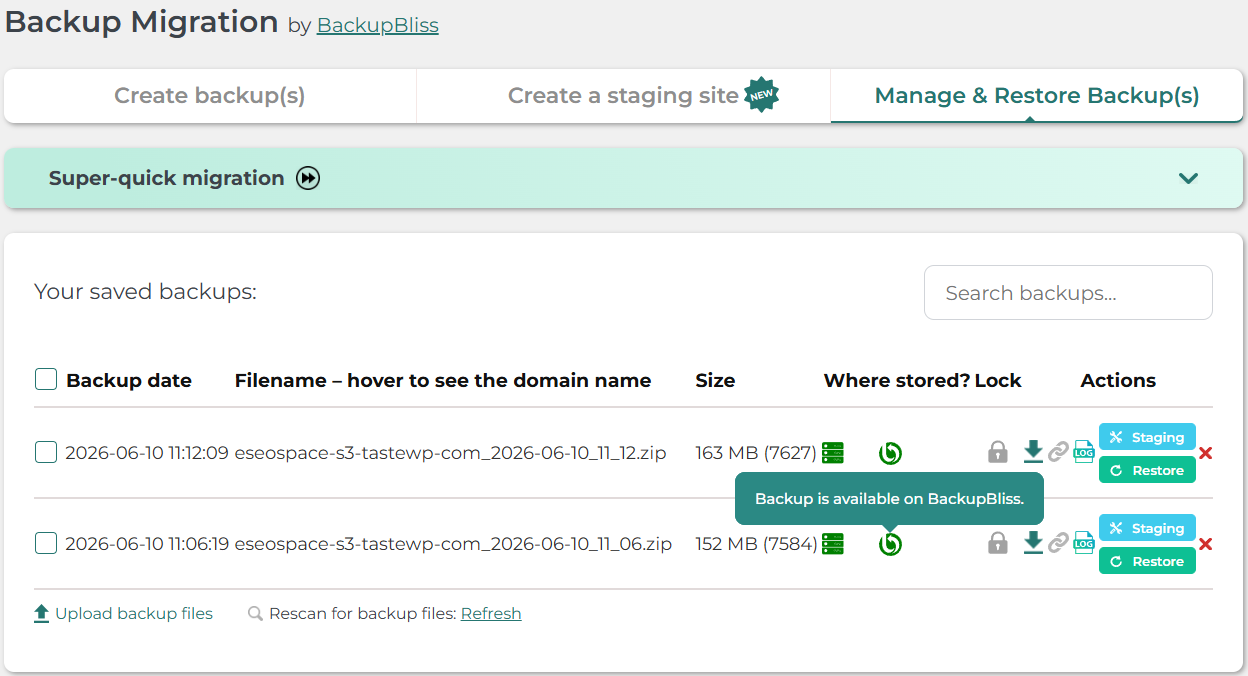
One of the more interesting examples of this approach is Backup Migration and its built-in cloud storage platform called BackupBliss. Rather than forcing users to immediately configure third-party storage before they can safely store backups off-site, Backup Migration includes its own integrated cloud storage solution from the start. More importantly, BackupBliss includes 1GB of free storage, making it the first WordPress backup plugin to provide its own native cloud storage tier free of charge. For smaller business websites, agency landing pages, blogs, and portfolio websites, that amount of storage is often enough to start creating secure off-site backups immediately.
The concept itself is surprisingly practical. Users still need to create an account and connect the storage using an API key, but the overall workflow feels more unified because the storage platform is designed specifically for WordPress backups and works directly inside the same ecosystem as the plugin itself.
After installation from the official WordPress repository, Backup Migration is ready to use almost immediately with sensible default settings already configured. Users can create a complete website backup containing themes, plugins, uploads, WordPress settings, and database content with only a few clicks.
The plugin also focuses heavily on automation. Scheduled backups can run quietly in the background at selected intervals, which is especially important for actively maintained websites where regular content updates, SEO changes, and plugin adjustments happen frequently. One particularly useful detail is that the scheduling system does not rely entirely on standard WP-Cron functionality, which is known to behave inconsistently on certain hosting environments. Instead, BackupBliss timing pings are used to improve scheduling reliability while WP-Cron remains available as a fallback option.
Cloud synchronization itself remains straightforward. Once BackupBliss is connected inside the “Where shall the backup(s) be stored?” section, newly created backups can automatically upload to the cloud after generation.
More Than Just Backups
Another reason why plugins like Backup Migration are becoming more relevant is that modern website management rarely revolves around backups alone. Migration tools have become equally important.
SEO agencies, developers, and freelancers regularly move websites between hosting providers, staging environments, or entirely new domains. Traditional WordPress migrations can quickly become tedious, involving manual database exports, file transfers, broken URL fixes, and search-and-replace operations inside the database itself.
Backup Migration simplifies much of this process by allowing users to restore websites directly from cloud backups, upload backup archives manually, or use direct backup links for quicker migrations between websites. In many cases, the plugin handles database adjustments automatically during restoration, reducing the amount of manual work needed afterward. For agencies handling multiple client projects, this can significantly reduce both migration time and the likelihood of technical mistakes.
Although BackupBliss is deeply integrated into the ecosystem, the plugin still supports additional storage providers including Google Drive, Dropbox, OneDrive, Amazon S3, FTP/SFTP, pCloud, and Wasabi. This allows users to maintain layered backup strategies if they prefer storing backups across multiple destinations.
A Simpler Direction for WordPress Backups
What makes this shift toward integrated backup ecosystems particularly interesting is that it reflects a broader change happening across WordPress itself. Website owners increasingly want tools that reduce fragmentation instead of adding more moving parts to manage.
They want systems that automate repetitive maintenance tasks, simplify workflows, and quietly protect websites in the background while allowing them to focus on content, marketing, and growth. Backup plugins with their own integrated cloud storage appear to move directly in that direction.
Whether this eventually becomes the standard approach for WordPress backups remains to be seen, but the idea itself feels logical. Backups are already one of the most essential parts of website maintenance, and integrating cloud storage directly into that process feels like a natural evolution rather than an unnecessary extra feature.
For WordPress users looking for a backup solution that combines automation, migration tools, cloud storage, and ease of use in one ecosystem, Backup Migration and BackupBliss represent a modern approach that aligns well with how websites are managed today.
Editor’s note: eSEOspace has been selected by Feedspot’s panel as one of the Top 30 California Web Design & Development Blogs on the web — a nod to the web design, development, and SEO insights we share here on the blog.
Frequently Asked Questions
Why are backups so important for WordPress websites?
How do traditional WordPress backup systems work?
What makes BackupBliss different from other backup storage options?
Is 1GB of free storage enough for my website backups?
How does BackupBliss improve backup scheduling reliability?
Put this into action with eSEOspace
We help businesses grow with website development that actually performs. Explore the services behind this guide:
Get a FREE GEO/AEO/SEO Audit
We'll analyze your site's SEO, GEO, AEO & CRO — completely free — and show you exactly how to get found across Google and AI answers.
Don't have a site yet? Get in touch →
Great — your audit is on the way!
We'll send your free SEO/GEO/AEO/CRO audit within the next few hours. Where should we send it?
You're all set! ✓
Your free audit is being prepared — check your inbox in the next few hours. Talk soon!








