



Blog
AI assistants like ChatGPT are changing how people find information. Instead of scanning a page of links, users ask a question and get a direct answer—often with a handful of suggested links to learn more. That shift raises a practical question for marketers and site owners: how do you know if ChatGPT is sending visitors to your site, and where do you track that?
This guide explains how ChatGPT can drive traffic, what you can and can’t measure today, and the exact steps and tools to attribute visits, leads, and revenue to AI assistants as reliably as possible.
Introduction
More buyers start their journey in AI tools. They ask for product recommendations, how-tos, comparisons, and local options. Sometimes AI provides links. Sometimes users copy a brand name and search for it. Either way, your site can benefit—but attribution isn’t as simple as a clean “chat.openai.com” referral in your analytics.
In this post, you’ll learn:
- How ChatGPT can generate clicks to your site
- Practical tracking tactics (UTMs, GA4 reports, server logs, heatmaps)
- What patterns to watch in “Direct” and “Unassigned” traffic
- The limits of attribution and how to work around them
- A simple framework to measure impact on conversions and pipeline
Understanding ChatGPT’s Role in Traffic Generation
ChatGPT influences traffic in a few ways:
- Direct link clicks: In many sessions, ChatGPT includes links to sources. Users click through to read more or verify details.
- Brand and query recall: Even without clickable links, a user may copy a brand name, product, or phrasing from ChatGPT and search for it on Google or Bing, resulting in organic search traffic to your site.
- Copy-paste navigation: Some users copy a URL shown in ChatGPT and paste it directly into the browser, which often shows up as “Direct” in analytics.
What you’ll see in analytics depends on the path:
- If a user clicks a link inside ChatGPT with standard behavior, you may see a referrer (usually chatgpt.com, or chat.openai.com in older data) or a utm_source=chatgpt.com tag, but this is not guaranteed. Many privacy and app contexts strip referrers.
- If a user copies/pastes a URL or clicks from a desktop app, you’ll likely see “Direct” traffic.
- If a user searches for your brand after seeing it in ChatGPT, you’ll see an uptick in branded organic queries and landing pages tied to brand terms.
Bottom line: Expect a mix across Referral, Direct, and Organic. Your job is to tag links where possible and triangulate the rest with patterns.
Tracking Traffic from ChatGPT
Because AI assistants don’t always pass referrer data, you’ll need a layered approach. Use UTMs where you control the link, then validate with analytics, behavior signals, and logs.
1) Use UTM parameters whenever you can
UTMs are query parameters you add to URLs to label visits. They show up in analytics even if referrers are stripped.
- Standard UTM template:
-
- utm_source=chatgpt
- utm_medium=ai_assistant
- utm_campaign=[topic or content piece]
- utm_content=[prompt or placement if relevant]
Example: https://example.com/guide?utm_source=chatgpt&utm_medium=ai_assistant&utm_campaign=ai_discovery
Where to use UTMs:
- In your own ChatGPT-integrated experiences (e.g., if you operate a GPT or provide a tool/integration that surfaces your links).
- In outreach or community engagement where you share links in AI-related forums, prompt libraries, or help docs describing how to use your product with ChatGPT.
- In partner content that is likely to be referenced by AI assistants (co-marketing pages, FAQs, official documentation).
Note: ChatGPT already appends utm_source=chatgpt.com to many links it shows in search answers, so look for that value in GA4 (often under Referral or Unassigned). Use your own UTMs only on links you control, and don’t reuse the chatgpt.com source value for them.
2) Monitor referral traffic in GA4 (and other analytics)
Even if referrer data is unreliable, check it—it sometimes appears.
- In GA4:
-
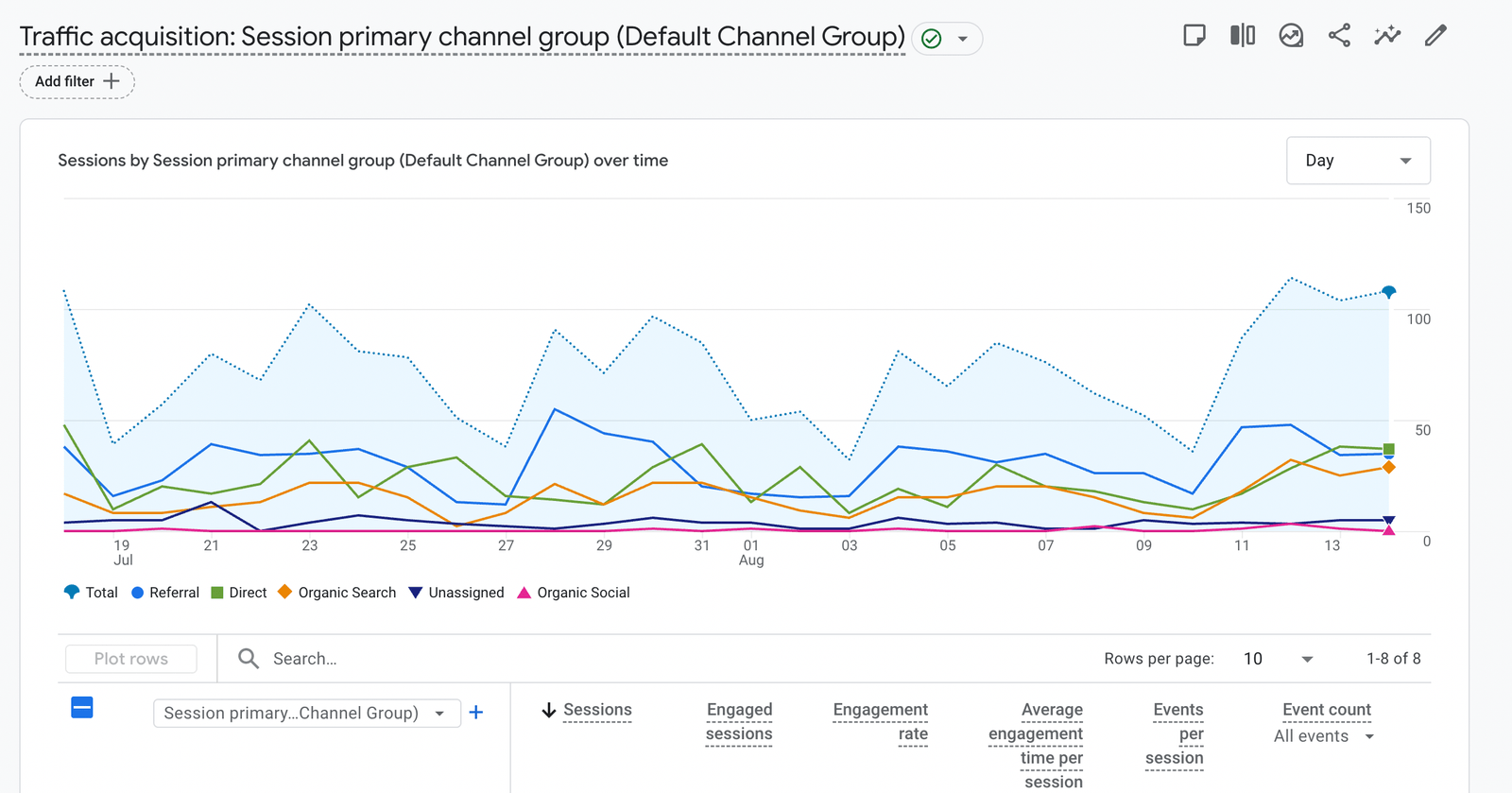
- Reports > Acquisition > Traffic acquisition
- Primary dimension: Session default channel group or Session source/medium
- Look for “chatgpt.com” (and the older chat.openai.com) in Session source, plus utm_source=chatgpt.com in Session manual source
- Create a custom report or exploration filtered by Source contains “openai” or “chat”
- Add secondary dimensions like Landing page + query string to see if UTM-tagged links are coming through
Also check:
- Google Search Console: For increases in branded queries after major content updates that might be cited by AI
- Bing Webmaster Tools: Similar branded query trends
3) Look for patterns in “Direct” traffic
A spike in Direct can be AI-assisted discovery in disguise.
What to look for:
- Landing page clustering: If “Direct” sessions land on deep educational pages (not just homepage), that’s a hint users pasted a specific URL copied from an AI chat.
- Time series correlations: Compare Direct sessions before/after you publish AI-friendly content (FAQs, comparison pages, how-tos). Annotate dates and look for step changes.
- Device mix: AI-driven copying often happens on desktop. If Direct spikes skew desktop and hit deep content, that’s another signal.
Pro tip: Build an Exploration report in GA4 where you:
- Segment Direct traffic
- Add Landing page, Device category, and New vs Returning
- Compare against a baseline period
4) Analyze user behavior and session data
Behavior can tell you if the visit followed an “AI intro -> confirm on site” pattern.
Signals to review:
- Short initial scroll + quick jump to CTAs suggests users were pre-primed by a summary and came to confirm details or take action.
- High scroll depth and time-on-page on FAQs and “What is/How to” pages may indicate AI-linked discovery.
- Event sequences: Pageview -> Scroll -> Outbound click to your app store, signup, or documentation can reflect “verification” behavior.
Set up:
- Enable enhanced measurement in GA4 (scroll, outbound clicks, site search).
- Track key events (signup, demo request, add to cart).
- Use segments to compare UTM-tagged “chatgpt” traffic vs. overall behavior.
Get a FREE Audit
We'll perform a comprehensive SEO, AEO, GEO & CRO audit of your website — completely free — and show you exactly how to outrank your competitors.
Don't have a site yet? Get in touch →
5) Collect self-reported attribution on forms
Add a “How did you hear about us?” question to lead gen and checkout flows.
- Include “ChatGPT/AI assistant” as an option.
- Keep it optional but visible.
- Map responses to your CRM so you can tie pipeline/revenue to AI-driven discovery.
Self-reported attribution often catches signals analytics miss.
6) Create AI-specific landing pages and UTMs
Publish a short explainer page like “Using [Your Product] with ChatGPT” and seed it in your docs and communities. Use a clean UTM when you share it in AI-related contexts. This gives you a controlled canary page to monitor AI-related traffic.
Tools and Platforms for Analytics
Use a stack that covers web analytics, behavior, identity, and raw logs.
Google Analytics 4 (GA4)
- What it’s good for:
-
- Channel and source/medium attribution for tagged links
- Trend analysis across Direct, Organic, and Referral
- Event and conversion tracking
- How to set it up:
-
- Configure conversions for signups, demo requests, purchases
- Build comparisons for utm_source=chatgpt
- Use Explorations to dig into landing pages, device, geography
Heatmaps and session replays (Hotjar, Microsoft Clarity, FullStory)
- Why use them:
-
- See how AI-attributed cohorts behave on-page
- Identify skim-and-click patterns consistent with AI-assisted discovery
- What to watch:
-
- Rapid navigation to pricing or docs
- High engagement with FAQ accordions and comparison blocks
CRM and marketing automation (HubSpot, Salesforce, Marketo)
- Tie UTMs and self-reported attribution to contacts and deals
- Build dashboards for “AI assistant-sourced pipeline”
- Compare close rates and velocity for AI-tagged leads vs. other sources
Server logs and CDN analytics
- Nginx/Apache logs, Cloudflare, Fastly
- What they reveal:
-
- Raw referrers when present
- IP, user agent patterns, and timing correlations
- Use cases:
-
- Validate spikes you see in GA4
- Catch edge cases where analytics scripts didn’t fire
Search tools (Google Search Console, Bing Webmaster Tools)
- Track branded query growth after publishing AI-friendly resources. For Google's own AI features, use Search Console's Generative AI performance report, and for Copilot citations, Bing Webmaster Tools' AI Performance report.
- See which pages gain impressions for “how to” and comparison intents
Challenges in Attribution
Attributing traffic to ChatGPT has real limitations. Plan for them.
- Referrer often missing: Many AI interfaces strip or don’t pass referrer data, so clicks look “Direct.”
- Multi-step journeys: Users may see your brand in ChatGPT, then search or visit later on another device. That splits the signal across channels and sessions.
- Shared keywords: Branded organic growth may be due to other campaigns (PR, social, ads), not just AI mentions.
- Inconsistent link handling: Some AI surfaces include clickable links; others don’t. Apps vs. web behave differently.
How to mitigate:
- Triangulate: Combine UTMs, GA4 patterns, self-reported attribution, and server logs.
- Use controlled experiments: Publish an AI-tailored page and promote it only in AI-related contexts with unique UTMs. Monitor lift.
- Annotate timelines: Note when you launch AI integrations, publish FAQs, or get featured in AI prompt libraries—then watch the data.
Practical Workflow: A 30-Day Attribution Plan
Week 1
- Add UTMs to any links you control (docs, partner pages, AI explainer).
- Configure GA4 conversions and a “chatgpt” comparison segment.
- Add “How did you hear about us?” with an “AI assistant/ChatGPT” option.
Week 2
- Launch or update AI-friendly pages: FAQs, comparison guides, “Using [Product] with ChatGPT.”
- Implement Hotjar or Clarity on these pages.
Week 3
- Review GA4: Direct and Referral trends, landing pages, device mix.
- Pull Search Console branded query trends.
- Check server logs/CDN analytics for referrers containing “openai” or “chat.”
Week 4
- Analyze session replays for AI cohort patterns.
- Report: Visits, conversions, and pipeline tied to utm_source=chatgpt + self-reported attribution + directional Direct/Organic lift.
Examples of What You Might See
- GA4 shows minimal “chat.openai.com” referrals, but Direct sessions to /guides/ai-integration surge 35% week-over-week, mostly desktop, with high scroll depth.
- Self-reported attribution: 12% of new demo requests chose “AI assistant/ChatGPT.”
- Search Console: Branded impressions up 18% after publishing AI FAQs.
- Server logs: A small number of hits with referrer “https://chat.openai.com/” on deep documentation pages.
Individually, each data point is weak. Together, they form a credible picture that AI is contributing.
Key Takeaways
- You won’t always see a clean “ChatGPT” referral. Expect traffic to show up as Direct, Organic, or occasional Referral.
- Use UTMs wherever you control the link. Standardize utm_source=chatgpt and track in GA4.
- Build GA4 explorations to analyze Direct spikes on deep pages, device mix, and behavior patterns.
- Add self-reported attribution on forms; it captures what analytics miss.
- Use heatmaps/session replays to study how AI-discovered users navigate.
- Check server logs and CDN analytics to validate referrers and timing.
- Triangulate across tools and run controlled experiments for stronger evidence.
- Tie everything to conversions and pipeline so you can prove business impact, not just visits.
Conclusion
Attributing traffic from ChatGPT isn’t plug-and-play yet. Referrers are inconsistent, and users take winding paths from an AI answer to your site. Still, you can build a reliable picture by combining UTMs, GA4 analysis, behavior insights, server logs, and self-reported attribution. Focus on measurable outcomes—signups, demo requests, purchases—and experiment with AI-specific pages and campaigns. As you refine your tracking, you’ll understand not only if ChatGPT is sending visitors, but also how to optimize their experience and convert that attention into real results.
Action steps:
- Standardize UTMs for AI-related links and configure GA4 conversions.
- Add “How did you hear about us?” with an “AI assistant/ChatGPT” option.
- Launch or optimize AI-friendly content and monitor Direct/Organic lift.
- Review heatmaps and session replays to tune page structure and CTAs.
- Reconcile analytics with server logs and CRM to quantify revenue impact.
Frequently Asked Questions
Will ChatGPT traffic show up as a clean referral in my analytics?
How can ChatGPT send visitors to my site?
What is the best way to track ChatGPT-driven visits?
What UTM parameters should I use for ChatGPT links?
Why does ChatGPT traffic often appear under Direct or Unassigned?
Put this into action with eSEOspace
We help businesses grow with website development that actually performs. Explore the services behind this guide:
Get a FREE GEO/AEO/SEO Audit
We'll analyze your site's SEO, GEO, AEO & CRO — completely free — and show you exactly how to get found across Google and AI answers.
Don't have a site yet? Get in touch →
Great — your audit is on the way!
We'll send your free SEO/GEO/AEO/CRO audit within the next few hours. Where should we send it?
You're all set! ✓
Your free audit is being prepared — check your inbox in the next few hours. Talk soon!








