
Here is what it does, what it costs and how it works.
LedgerMCP was built by eSEOspace, and we also run its website and search marketing. This guide uses the company's own published information, checked on 22 October 2026, and every source is listed at the end. We don't rate or score our clients. Prices and features change, so confirm them on ledgermcp.com before you sign up.
The short answer
LedgerMCP is online double-entry bookkeeping software with an MCP server built in, so an AI assistant such as Claude, ChatGPT or Grok can keep the books for you: import statements, categorize transactions, reconcile accounts and run reports. It is made by LedgerMCP, LLC, which says it is based in Florida, and it serves small businesses, freelancers, landlords, bookkeepers and CPAs, plus people tracking personal money. The software itself is free (unlimited books, all reports, your own AI). Paid plans add live bank feeds: $9, $39 or $249 a month, priced by connected bank accounts. Support is by email at support@ledgermcp.com.
| Business | LedgerMCP (LedgerMCP, LLC) |
|---|---|
| What it does | Double-entry bookkeeping software that AI assistants can operate through the Model Context Protocol (MCP), plus a full web app for people |
| Based in | Florida, United States (company's statement); books kept on US servers |
| Works with | Claude (claude.ai, Desktop, mobile, Claude Code), ChatGPT, Grok, Cursor and other MCP clients |
| Who it serves | Small businesses, freelancers and sole proprietors, landlords, bookkeeping and CPA practices, and personal-finance users |
| Price range | Free; paid plans $9, $39 and $249 a month, billed monthly |
| Free trial | No trial needed for the software; live bank feeds are free for 14 days (up to 5 accounts) |
| Not included | Payroll, inventory and multi-currency accounting (the company says so plainly) |
| Support | Email only: support@ledgermcp.com, reply within one business day (company's figure) |
| Website | ledgermcp.com |
What is LedgerMCP?
LedgerMCP is accounting software built around one idea: the AI assistant you already use should be able to do your bookkeeping, not just talk about it. Under the hood it is a real double-entry ledger with a chart of accounts, journal, reconciliation and the standard reports. On top sits an MCP server: one web address that lets an AI assistant read the books and make changes through a defined set of tools.
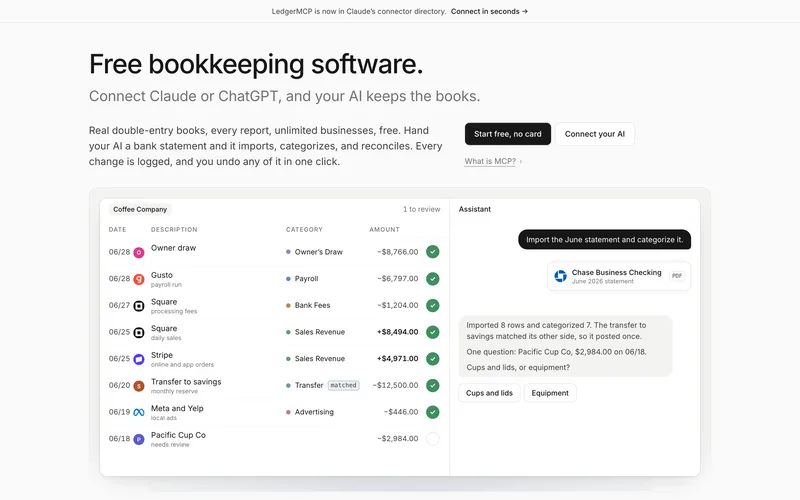
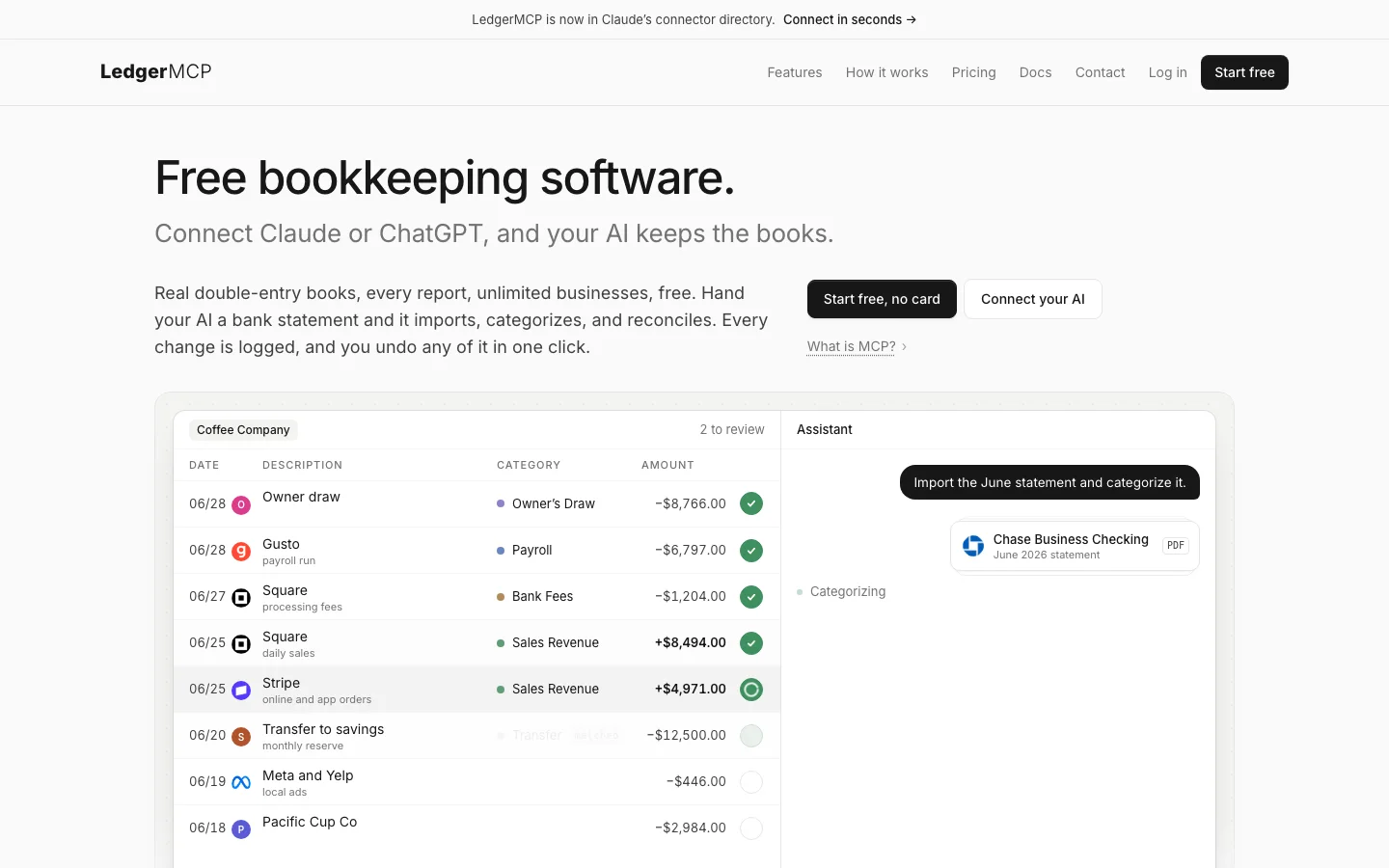
In practice that means you can hand Claude or ChatGPT a bank statement and say "import this and categorize it," and the assistant posts real journal entries rather than writing you a summary. The company's own home page shows the pattern with a demo coffee shop: an 84-row June statement imported, 81 rows categorized, 3 flagged for review, the account reconciled to the statement and the month locked.
You do not have to use an AI. The company says the web app is a complete bookkeeping tool on its own, and that many owners run entirely in the web app and never connect an assistant. The AI simply works on the same books.
Who runs LedgerMCP?
The product is made by LedgerMCP, LLC. Its About page says the company is based in Florida, United States, and describes itself as "small on purpose." Its Terms of Service are governed by Florida law. The site does not name its founders or staff; the contact page says email "reaches all of us."
The About page lists three principles: bring your own AI or use the built-in one; safety enforced in the database (Postgres) rather than in prompts or app code; and "free must mean free," with only the things that cost the company money to run (bank connections and the built-in assistant's model usage) on paid plans. The company says it makes money from those paid plans and from emailing invoices, and that it does not run ads, sell data, or train AI models on your books.
Is LedgerMCP legit?
People ask this about any new tool that touches bank data. Here is what can be checked on the public site:
- A named legal entity and written policies. The legal page lists nine dated policy documents, including a Privacy Policy, Terms of Service, Billing and Refund Policy, Data Retention and Disposal policy, Subprocessors list and a Data Processing Agreement.
- Named vendors for the sensitive parts. The subprocessors page names Plaid Inc. for bank connections, Stripe, Inc. for payments, Google LLC for website analytics, and Anthropic, PBC (Claude Sonnet) as the model provider behind the built-in assistant. Other infrastructure vendors are listed by function, all located in the United States.
- A public tool reference. The full list of 72 MCP tools is published in the docs, which the company says are generated from the live tool registry.
- A self-check you can run. A "books health check" re-derives the math from raw postings: every entry balances, the trial balance ties and the accounting equation holds.
- A directory listing. The company says LedgerMCP is listed in Claude's connector directory, so Claude users can add it without pasting an address.
The site does not publish customer counts, reviews or testimonials. A practical test is to run one month of real statements on the free plan and read the activity log afterwards.
How does LedgerMCP work?
The company describes three parts: your AI, which plans the work and calls tools; the MCP server, which exposes the bookkeeping job as 72 tools; and the ledger, which enforces the accounting rules so the AI cannot write books that don't balance. A typical month, as the How It Works page lays it out:
- Connect once. Add LedgerMCP to your AI and ask it to set up books. A new business book comes with a standard small-business chart of accounts; a personal book gets everyday categories instead.
- Import. Transactions come in three ways: live bank feeds through Plaid (paid after a 14-day trial), a statement file you hand your AI (CSV, OFX/QFX or PDF, free), or manual entry. Imported rows are de-duplicated and land in a review queue. Nothing posts to the ledger by itself.
- Categorize. The AI assigns categories, splits mixed charges, matches transfers between your own accounts, flags possible duplicates and tags vendors. Anything it is unsure about stays flagged for you.
- Review. Skim the flagged rows in the web app, or ask your AI what it was unsure about. Your answer books the row, and you can save it as a rule for next time.
- Close. Reconcile each account to its statement balance, book depreciation if you have fixed assets, and lock the period so nothing, human or AI, can post into a closed month.
- Report. Ask for a P&L, balance sheet, trial balance or cash flow statement in plain language, or open them in the app.
Months behind? The company pitches catch-up as a main use: hand the AI one statement at a time, and bulk import skips duplicate rows.
When the AI gets something wrong, you tell it or fix it in the app. Postings are never edited: a correction reverses the original and posts a linked new entry, and the merchant is remembered.
What it does, feature by feature
The features page says everything below works both for an AI over MCP and for a person in the web app, and that none of it costs extra.
| Feature | What the site says it does |
|---|---|
| Categorize and split | Each category posts a balanced journal entry. One charge can be split across several categories (for example, part supplies and part personal) or a loan payment split into principal and interest. |
| Book rules | Rules such as "this Zelle payment is always rent" are saved to the book, so every future session keeps the books the same way. The ledger also remembers each merchant's last category. |
| Transfer matching | Money moved between your own accounts is detected and booked as a transfer, never as income or expense. You confirm the match; it never auto-matches on its own. |
| Bank feeds and imports | Live feeds through Plaid on paid plans; CSV, OFX/QFX and PDF statement import on every plan; offline accounts for loans, brokerage or any account without a feed. |
| Bank reconciliation | Two modes: whole-balance (compare the statement ending balance with the computed book balance) or a classic check-off worksheet. Each tie-out is saved as proof, and a mismatch returns a ranked list of likely causes. Brokerage and loan accounts can be set to a statement figure. |
| Period locks | After a month is closed, it can be locked so nothing posts into it. |
| Financial reports | Profit and loss (with period comparison), balance sheet as of any date, trial balance, cash flow statement, month-by-month P&L trend, and spending by category and by tag. Every number drills down to the entries behind it. |
| Report share links | A read-only link to one report and date range for your accountant, no login needed. It expires after 7 or 30 days, can be revoked, and is never indexed by search engines. |
| Invoices and bills | Record bills; send invoices from a hosted page with your logo and payment link, including recurring invoices. The link is free on every plan; sending by email needs a paid plan. |
| Tags, receipts, fixed assets | Tag transactions by project, client, vendor or property; attach receipts to transactions and W-9s to vendors; register assets and book depreciation as part of the close. |
| Recurring charges | Detects weekly, biweekly, monthly or yearly charges after three steady occurrences, and flags price changes, double charges and bills that didn't arrive. |
| Cash-flow calendar, budgets | A 30-day day-by-day balance projection, monthly budget targets with optional rollover, net worth and a safe-to-spend number (aimed mainly at personal books). |
| Export | One click exports a whole book as a ZIP: ten CSV files (transactions, general ledger, accounts, tags, journal, assets, rules, questions, reconciliations, audit log) plus receipts and bank statements. |
Which AI assistants work, and how to connect them
LedgerMCP is a hosted MCP server, so there is nothing to install. The company lists Claude, Claude Code, ChatGPT, Grok and Cursor by name, plus "any MCP client." Sign-in is passwordless: you enter your email and a 6-digit code, and a new account is created during sign-in if you don't have one. The site's published steps:
- Claude (claude.ai, Desktop app, iOS, Android): Settings, then Connectors, then the + button to browse the directory. Search for LedgerMCP, click Connect and sign in with the email code. No address to paste.
- ChatGPT: on the web, open Settings, Connectors, Advanced settings and turn on Developer mode. Then create a connector named LedgerMCP with the server address https://ledgermcp.com/mcp and sign in. The docs note that custom connectors need a paid ChatGPT plan (Plus, Pro, Business, Enterprise or Edu, per the ChatGPT page).
- Grok: at grok.com/connectors choose New Connector, then Custom, enter the same server address and sign in.
- Claude Code: one terminal command adds the server, then the
/mcpcommand walks you through the same browser sign-in. The company says this also works in the Claude desktop app. - Cursor and other MCP clients: the docs describe a configuration file you paste into the client.
The same books are reachable from every assistant and from the web app, so you can switch tools without moving data. The site also describes a read-only option for an assistant that should report but never write.
How much does LedgerMCP cost?
The software is free. You pay only for live bank feeds and, on the top two plans, the built-in assistant with Autopilot. These are the prices published on the pricing page on 22 October 2026.
| Plan | Price | Connected bank accounts | What it adds |
|---|---|---|---|
| Free | $0, "free forever" | Feeds free for 14 days, up to 5 accounts | Unlimited books, all reports, CSV and manual imports, your own AI over MCP; no card required |
| Starter | $9 a month | Up to 10 | Live bank feeds; the same small built-in assistant allowance as Free, per the pricing page |
| Growth | $39 a month | Up to 20 | Live feeds plus AI Bookkeeping + Autopilot |
| Scale | $249 a month | Up to 100 | Live feeds plus AI Bookkeeping + Autopilot across every book, with higher fair use; aimed at firms and multi-book practices |
How the count works. The price depends on how many bank or card accounts have a live Plaid feed, counted across all your books, not per book. Offline accounts fed by CSV or manual entry never count. The company's own examples: a freelancer with one checking account is $9; an owner with two businesses and personal books and five connected accounts is still $9; an agency with 12 connected accounts is $39; a bookkeeping practice with 25 client books and three accounts each (75 in total) is $249.
Billing. Monthly, in advance. There is no annual plan and no annual discount. You upgrade or cancel from Billing in Settings.
Limits. Books, transactions, reports and your own AI over MCP are not metered on any plan. The company describes two anti-abuse ceilings on free accounts, 50,000 stored transactions and 1,000 sets of books, and says support will raise either on request. The built-in assistant comes with a monthly allowance on every plan; the pricing page calls it small on Free and Starter and describes a fair-use ceiling on Growth and Scale.
Downgrading or a failed payment. Feeds pause and the assistant drops back to the Free allowance. Your books, history, reports and your own AI's access keep working, and imported transactions stay put.
The built-in assistant and Autopilot
LedgerMCP has two ways for AI to work on your books. The first is bring your own AI: you connect Claude, ChatGPT or another assistant over MCP, free on every plan. The second is the built-in assistant inside the web app, for owners who want no setup at all.
On Growth and Scale, the built-in assistant comes with Autopilot. The pricing page says it "categorizes every row it is sure of," and anything else comes to you as a question; your answer books it. The plan description adds that "one email a month asks what only you can answer." Per the site's agent guide, plans without Autopilot get one 30-day trial of it.
According to the subprocessors page, the built-in assistant runs on Anthropic's Claude Sonnet model and processes the book data and files you submit to it to answer your request, not to train models. When you connect your own AI instead, that assistant is governed by your own agreement with its provider.
Is it safe to let an AI write to your books?
This is the question the whole product is designed around. The company's answer is that the ledger protects itself, so the worst a confused AI can do is "post a balanced, logged change you can reverse in one click." The safeguards it describes on the security page:
- Always balanced. Debits must equal credits to the cent, or the database rejects the write.
- Immutable postings. No edit and no delete, "for anyone, including us." The company says UPDATE and DELETE are revoked at the database level for every role. Corrections post as new, linked reversals, and both stay in the journal.
- Repeats and drift. A request that arrives twice is recorded once, and balances are computed from postings when you ask rather than stored.
- Locked periods. Nothing posts into a locked month, not you and not your AI.
- Human-only deletes. Destructive operations stay in the web app and are not offered to the AI. The docs list a small set of tools marked destructive, which retract earlier writes or merge two bank accounts.
- An activity log. Settings, then Activity, shows which connection, which tool and what changed, with a one-click reverse.
- Read-only access. You can give an assistant read-only access so it can answer questions and run reports but never write.
Under the Terms of Service, you are responsible for the actions of AI agents you connect and for reviewing their work, and the software is a tool, not an accountant.
Bank data, privacy and where data lives
- Bank logins. LedgerMCP says it never sees or stores your bank login. You authenticate with your bank through Plaid, and the access tokens are encrypted at rest (AES-256-GCM, per the security page) and never reach your browser. You can skip feeds entirely and import statements instead.
- Sign-in. Passwordless 6-digit email codes, with optional TOTP two-factor authentication.
- Transport and storage. All traffic over TLS 1.2 or higher, row-level separation of each owner's data, and daily database backups.
- Location. The footer says books are kept on US servers, and every listed subprocessor is located in the United States.
- Tracking. One session cookie plus Google Analytics on the public pages only, not inside the signed-in app. The company says no ad tech and no cross-site tracking.
- No data sales or model training. The company says it does not sell data, run ads or train models on your books.
- Retention. Books, files and the audit log are kept for the life of the account; account data is removed within 30 days of a verified deletion request, and application logs roll over within 90 days. A keyed hash of your email address is kept to stop repeat free trials.
- Compliance. A Data Processing Agreement is published, and the full vendor list is offered under NDA.
Tax reports: Schedule C, 1099 and sales tax
LedgerMCP prepares numbers; it does not file anything. This guide is general information, not tax or accounting advice; confirm tax treatment with a qualified tax professional.
- Schedule C. The report regroups a year of books onto IRS Schedule C lines (gross receipts on line 1, expenses on lines 8 through 27a) and shows per-line totals and net profit. Each expense account carries a line mapping; for unmapped accounts the software suggests one and the owner confirms it, since the company calls the mapping "a tax judgment." It is aimed at sole proprietors and single-member LLCs. It exports to CSV and does not e-file.
- 1099 report. Tag vendor payments through the year and the report totals net payments per vendor, flags anyone at or above the year's reporting threshold, and marks vendors missing a W-9. The site states the threshold as $2,000 for payments made in 2026 and $600 for earlier years. Refunds from a vendor reduce its total. It does not file 1099 forms.
- Sales tax report. Totals invoiced and collected by rate, from the rates you set on invoices.
- Rental properties. The landlord page says plainly that rentals report on Schedule E and LedgerMCP does not fill that form; it gives your preparer per-property reports and CSV exports instead.
The site also has three free browser calculators (self-employment tax, 1099 threshold and bookkeeping cost), which the company describes as estimates, not tax advice.
For bookkeepers and CPA practices
The CPA page pitches LedgerMCP as client bookkeeping "without per-client fees." Each client is its own book on one account, with its own chart of accounts, reports and lock dates, and client books are free. Bank feeds are pooled across the whole practice, so the company's figure is $249 a month at most for up to 100 connected accounts.
- Engagement flow. Open a client book in one sentence, hand the AI the client's statements for catch-up, then reconcile, book depreciation, lock the period and export.
- Roles. Staff join by email as full members and can do everything except billing. Clients get a review-only view: dashboard, reports and the charges you asked them about, with no ability to change a number. AI access can be limited to specific books or made read-only.
- Review trail. Immutable postings, period locks and an append-only log of every AI write, which the company presents as something you can hand a reviewer.
- Between books. A tool books a payment one entity made on another's behalf on both sides at once.
- Stated limits. Payroll, inventory and multi-currency are out of scope: "If your engagement needs those, we are the wrong tool for that client."
For freelancers, landlords and personal books
Freelancers get the same free ledger plus the Schedule C report, which the company says handles splitting travel and meals the way the form wants. The freelancer page points to a year-to-date P&L for quarterly estimates and to the self-employment tax calculator for the SE piece. Personal spending on a business card is booked to Owner's Draw, and a business expense paid personally to Owner's Contribution, so the books still tie to the bank.
Landlords can run one book per property or one book with a tag per property; either way, per-property reports come out. The landlord page describes three things the AI books "the way an accountant would": mortgage payments split into interest (an expense) and principal (paying down the loan), security deposits held as a liability rather than income, and flagging charges that might be a repair or a capital improvement. Feeds are priced across all books, "not per property."
Personal books are free on the same terms. A book set to personal gets everyday categories (groceries, rent, dining, subscriptions), the P&L relabeled as Income and Spending and the balance sheet as Net worth, plus budgets and subscription alerts.
What LedgerMCP does not do
The company is direct about this on its About and CPA pages. LedgerMCP is not:
- Payroll software
- Inventory software
- Multi-currency accounting
- A tax filing or e-file service (Schedule C and 1099 reports are prepared, not filed)
- An accountant, auditor, tax advisor or fiduciary (Terms of Service, section 8)
Support is email only. The contact page says there is no phone or chat support "yet," and that replies come within one business day for almost everything.
Cancellation, refunds and leaving
- Cancel anytime from Settings, then Billing: "no email required, no retention flow." Feeds run to the end of the paid period, then stop; those accounts and their history stay in your books as offline accounts.
- Refunds. The current month's charge is generally not refunded; the plan ends at the period close. If something went wrong (a double charge, a plan change that didn't apply, feeds that never worked), the company says to email support@ledgermcp.com with "Billing" in the subject and it "will make it right."
- Upgrades take effect immediately; downgrades at the start of the next billing period.
- Leaving. Export each book in one click, with no exit fees or export caps. Deleting your account from Settings removes books, files and bank connections; the retention policy covers the backup window.
- Eligibility. You must be at least 18. Disputes go to state or federal courts in Florida under Florida law.
How it compares with other options
| Option | What you get | Typical trade-off |
|---|---|---|
| LedgerMCP with your own AI | A double-entry ledger your assistant operates; free software, feeds from $9 a month | You review the AI's work; no payroll, inventory or multi-currency; email-only support |
| Mainstream per-company accounting software | A mature desktop or cloud app, often with payroll and inventory add-ons | Usually a monthly fee per company file; AI features are typically a helper inside the app rather than full access |
| A human bookkeeping service | A person or team keeps your books and answers questions | Usually the highest monthly cost; you depend on their schedule |
| A spreadsheet | Free and flexible | No double-entry checks, no reconciliation proof, easy to miss a row |
| Chatting with an AI about a CSV | Quick answers and summaries | Nothing is saved as books; no audit trail, lock dates or reconciled balances |
Who it suits, and who should look elsewhere
A good fit if you…
- Already use Claude, ChatGPT, Grok or Cursor and want it to do the data entry
- Run a small business, freelance or side business, or own a few rentals
- Are months behind and want to catch up from statements
- Run many client books and don't want per-client software fees
- Want proof the books tie: reconciliations, locks and an activity log
- Are happy importing statements, or paying a small fee for live feeds
Look elsewhere if you…
- Need payroll, inventory or multi-currency in the same system
- Want a person to keep your books and answer calls
- Need phone or live chat support
- Want software that files your tax forms or 1099s for you
- Need a filled-in Schedule E for rentals rather than reports for your preparer
- Are not willing to review what an AI has categorized
Questions to ask before you start
- Will I import statements, or do I need live feeds? How many accounts would that be across all my books?
- Does my AI subscription support custom connectors (for example, ChatGPT needs a paid plan with Developer mode)?
- Do I want the AI to write, or only to read and report?
- Who reviews the flagged rows each month, and who locks the period?
- Will my accountant work from the exports, share links and Schedule C or 1099 reports?
- Do I have payroll, inventory or foreign-currency activity that needs another tool alongside?
How to get started
- Read how it works and the pricing page.
- Click "Start free" on the site (no card), or add LedgerMCP to your AI and sign in with the 6-digit email code; the account is created then.
- Ask your AI to set up a business or personal book.
- Hand it one month's statement (CSV, OFX/QFX or PDF), let it import and categorize, and answer what it flags.
- Reconcile to the statement balance and open Settings, then Activity, to see exactly what changed.
- Questions: email support@ledgermcp.com.
Terms you'll see on the site
- MCP (Model Context Protocol): a standard way for an AI assistant to connect to an app's data and tools.
- Double-entry bookkeeping: every transaction is recorded as equal debits and credits in at least two accounts, so the books always balance.
- Book (business): one separate set of books inside your account.
- Reconciliation: checking the book balance for an account against the bank statement for the same date.
- Lock date: the date up to which a period is closed; nothing can post on or before it.
- Reversal: a new entry that cancels an earlier one, used instead of editing.
- Owner's Draw / Owner's Contribution: money the owner takes out of, or puts into, the business.
- Schedule C / 1099-NEC / W-9: the IRS form for sole-proprietor business income, the form for reporting payments to contractors, and the form a contractor gives you with their tax details.
Frequently asked questions
What is LedgerMCP?
LedgerMCP is double-entry bookkeeping software with an MCP server built in, so AI assistants like Claude, ChatGPT and Grok can import, categorize, reconcile and report on your books. It also works as a normal web app without an AI.
Is LedgerMCP free?
Yes. LedgerMCP says the software is free forever with no card: unlimited books, all reports, CSV and manual imports, and your own AI over MCP. Paid plans ($9, $39 or $249 a month) add live bank feeds, and the top two add the built-in assistant.
How much does LedgerMCP cost with bank feeds?
Starter is $9 a month for up to 10 connected bank accounts, Growth $39 for up to 20, and Scale $249 for up to 100, counted across all your books. Billing is monthly with no annual plan.
Who owns LedgerMCP?
LedgerMCP is made by LedgerMCP, LLC, which says it is a small company based in Florida. The site does not name its founders.
Can Claude do my bookkeeping with LedgerMCP?
Yes. LedgerMCP says it is in Claude's connector directory: add it under Settings, Connectors, sign in with a 6-digit email code, and Claude can import statements, categorize, reconcile and run reports on your books.
Does LedgerMCP work with ChatGPT?
Yes. In ChatGPT you turn on Developer mode, create a connector pointing to LedgerMCP's server address and sign in. LedgerMCP's docs note that custom connectors need a paid ChatGPT plan.
Is it safe to let an AI write to my LedgerMCP books?
LedgerMCP says every entry must balance or the database rejects it, postings can't be edited or deleted, nothing posts into a locked period, and every AI change is logged and reversible in one click. You can also give an assistant read-only access.
Does LedgerMCP store my bank password?
No. LedgerMCP says bank connections go through Plaid, so you log in with your bank directly, and the access tokens are encrypted at rest. You can also skip feeds and import statements.
Does LedgerMCP use my data to train AI?
LedgerMCP says it never trains models on your books and does not sell data or run ads. What your own AI does with conversation data depends on your plan with that AI provider.
Does LedgerMCP do payroll or inventory?
No. LedgerMCP says it deliberately does not do payroll, inventory or multi-currency accounting.
Does LedgerMCP file my taxes or 1099s?
No. LedgerMCP prepares a Schedule C report and a 1099 report for you or your CPA, but it does not e-file any form.
Can bookkeepers manage client books in LedgerMCP?
Yes. Unlimited client books are free on one account, staff can join as full members, and clients can get a review-only view. Bank feeds are priced across the whole practice, not per client.
How do I contact LedgerMCP support?
Email support@ledgermcp.com. LedgerMCP says it replies within one business day and does not offer phone or chat support yet.
Can I cancel LedgerMCP and keep my data?
Yes. You cancel from Settings, Billing, and your books, reports and AI access stay on the free plan. You can export each book as a ZIP of CSV files plus receipts at any time.
Sources
All pages checked on 22 October 2026.
- LedgerMCP, home page: ledgermcp.com
- About: ledgermcp.com/about
- How it works: ledgermcp.com/how-it-works
- Pricing: ledgermcp.com/pricing
- Features: ledgermcp.com/features
- Feature pages: categorization, bank reconciliation, financial reports, Schedule C, 1099 report, subscriptions and recurring
- Security: ledgermcp.com/security
- Connection guides: Claude connector, Claude Code, ChatGPT, Grok
- MCP documentation: ledgermcp.com/docs and the agent guide ledgermcp.com/llms.txt
- Audience pages: CPAs and bookkeepers, freelancers, landlords, personal finance
- Free tools: ledgermcp.com/tools
- Contact: ledgermcp.com/contact
- Legal and policies: ledgermcp.com/legal, Terms of Service, Privacy Policy, Billing and Refund Policy, Subprocessors, Data Retention and Disposal



