



Best IT asset management software in 2026: 8 tools compared on fit and cost
Best IT asset management software in 2026: 8 tools compared on fit and cost
On October 14, 2026, commercial Extended Security Updates for Windows 10 enter year two, and Microsoft's doubling rule moves the price from $61 to $122 per device. Coverage is cumulative, so a PC enrolled late costs $183. For 300 unmigrated machines that is $36,600 for one year. Every retired laptop still listed as active gets paid for, and every active one missing from the list goes unpatched.
That is the practical case for IT asset management (ITAM) software: it discovers hardware, software and cloud resources automatically, keeps each in a register with an owner, contract and lifecycle state, and links those records to the tickets and changes that touch them. A spreadsheet can hold the register, badly, and nothing else.
The shortlist for the best IT asset management software in 2026 also looks different from two years ago. ServiceNow repackaged its ITSM tiers in April, Lansweeper's paid plans start at 2,000 assets, and AI subscriptions have become an asset class that needs an owner and a renewal date. The eight tools below are ranked for mid-market IT teams of roughly 2 to 35 technicians and 100 to 5,000 devices.
The best IT asset management software in 2026 at a glance
2026 list prices, billed annually, from vendor pricing pages or, where none exist, independent price trackers.
| Tool | Best for | Discovery | Service desk | Hosting | Entry list price |
|---|---|---|---|---|---|
| Alloy Navigator + AlloyScan | Mid-market teams, 2 to 35 technicians | Agentless and agent, network devices, ESXi, AWS, Azure, GCP, Jamf | Built in | SaaS, on-prem, or your own Azure/AWS | $19/tech/month (Explorer); $49 (Express) |
| ServiceNow ITAM | Enterprises with 100+ IT staff | Via ITOM, Advanced tier and up | Built in | SaaS | Quote; est. $70 to $100 per fulfiller/month |
| Lansweeper | Discovery feeding another service desk | Agentless and agent, OT, cloud | No; enriches tickets in other desks | Cloud with local scanners | Free to 100 assets; $239/month to 2,000 |
| ManageEngine AssetExplorer | Budget-bound, on-prem shops | Agentless and agent | Separate (ServiceDesk Plus) | On-prem or cloud | Free to 25 assets; $955/year at 250 (cloud) |
| Freshservice | Cloud-only, ITSM-first teams | Network probe and agent | Built in | SaaS only | $19/agent/month; 100 assets included |
| InvGate Asset Management | Per-device pricing, fast rollout | Agent and network scan | Separate product | SaaS; on-prem on Enterprise | $1,499/year for 500 devices |
| Ivanti Neurons for ITAM | Security-led teams on Ivanti | Agent, agentless, connectors | Via Neurons for ITSM | SaaS | Quote |
| Snipe-IT | Barcode-based hardware tracking | None | No | Self-hosted or hosted | Free; hosted from $39.99/month |
How the tools were evaluated
Five questions decided the order. Does discovery reach remote laptops, hypervisors and cloud accounts without extra products? Do asset records link to tickets, changes, users and contracts in one database? Can it run on-premises when a regulator or an air-gapped network requires it? What happens to the bill when devices outnumber technicians 200 to 1? And how much configuration does it take before the data can be trusted?
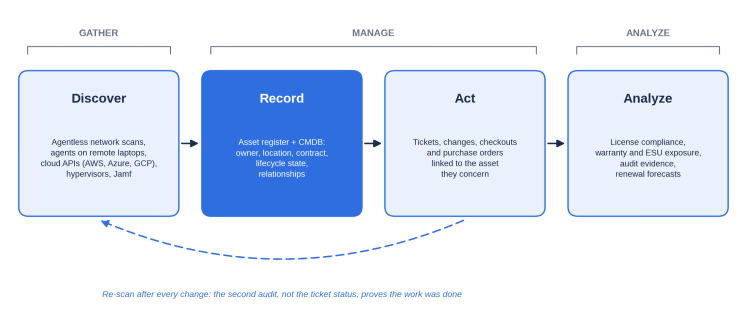
The last question gets underestimated. Alloy Software's sales team describes ITAM as three jobs: gathering data, managing it and analyzing it. Most rollouts plan the first two and meet the third when someone asks for a report. If categories and asset types are not designed before the first import, the reports come out wrong whatever the product.
The 8 best IT asset management tools, reviewed
Alloy Navigator with AlloyScan: best overall for mid-market IT teams
Alloy Software, founded in New Jersey in 2002, sells two products that share one data model. Alloy Navigator covers the service desk, asset management, CMDB, change management, purchase orders, contracts, consumables and equipment checkout. AlloyScan handles discovery and audit, replacing the legacy on-premises Alloy Discovery, so new deployments should start there.
AlloyScan audits Windows, macOS and Linux agentlessly, through an Audit Service on one Windows host per network, or with an agent that reports over outbound HTTPS on port 443, which covers laptops that never touch the VPN. It also inventories network devices and VMware ESXi hosts. Version 26.9, released September 15, 2026, added cloud workers that audit AWS, Azure, Google Cloud, Google Directory and Jamf with no local service. Scans do not consume audit quota, so you can sweep a whole subnet and audit only what matters.
In Navigator, a ticket links to the computer, its user, location and warranty contract. New asset types, lifecycle states and approval steps are configuration, not development, which is why some customers have stayed 15 years or more. Hosting is the other differentiator: SaaS, your own servers, or your own Azure or AWS tenant. In Alloy's review of 40+ deals closed in 2024 to 2026, about 40% of buyers required on-premises hosting, mostly hospitals, public-sector bodies and air-gapped sites.
Pricing is per technician with unlimited requesters. Explorer costs $19 a month for up to three technicians, Express $49 (adds change management, approvals and software licensing) and Enterprise $89 (adds the CMDB, service catalog, ITIL processes and projects). Auto-discovered computers need audit licenses; imported records are free. Module details are on Alloy'sIT asset management software page.
Where it falls short: cloud hosting and training are billed separately, and the flexibility means someone must design workflows before go-live. MSPs should test billing: a Swedish IT services firm on Navigator Express since February 2023 rates its inventory and knowledge base highly but names invoicing as the weak spot.
ServiceNow IT Asset Management: best for enterprises already on the Now Platform
ServiceNow has the deepest CMDB model here and the widest workflow reach outside IT. On April 9, 2026 it replaced its ITSM editions with Foundation, Advanced and Prime tiers that bundle Now Assist AI, metered through pools of assists. There is no public price. Independent estimates put Foundation at $70 to $100 per fulfiller per month, and CostBench reports a median annual contract near $130,000.
Where it falls short: automated discovery sits in ITOM, which has no Foundation tier, so discovery starts at Advanced. Implementations are usually partner-led.
Lansweeper: best for discovery depth feeding another service desk
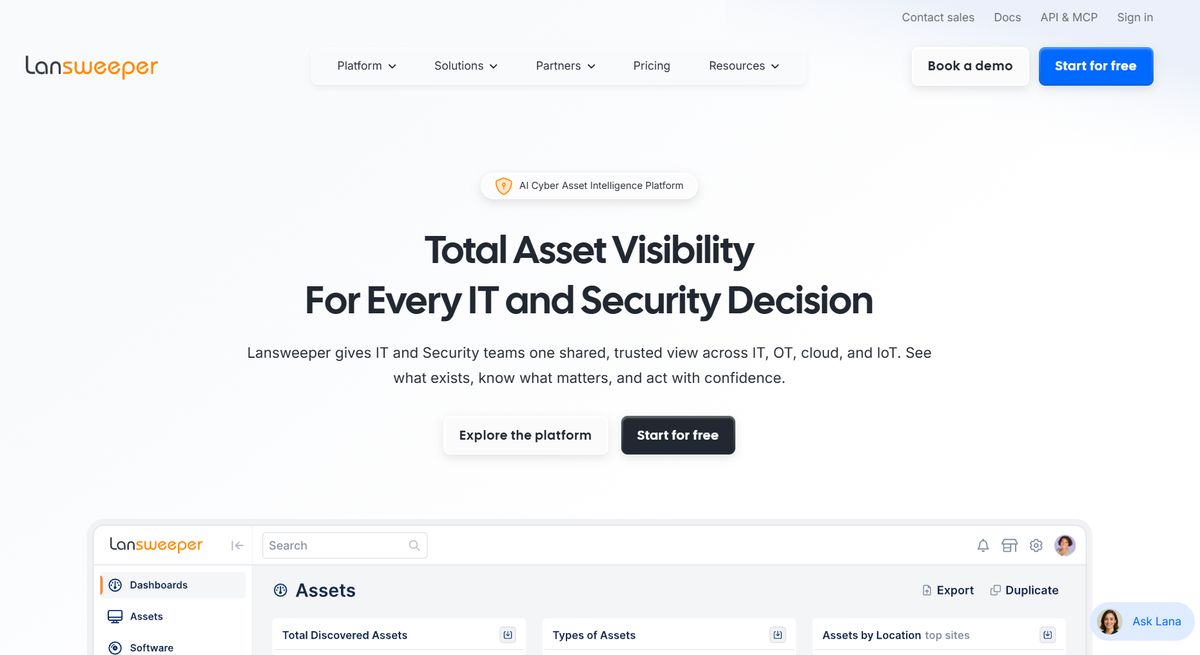
Lansweeper's scanner recognizes more device types than most peers, including OT and network gear, and the free tier covers 100 assets. Starter costs $239 a month for up to 2,000 assets; Pro, at $439, adds vulnerability insights.
Where it falls short: there is no native service desk, only ticket enrichment for tools such as Jira. The paid floor is 2,000 assets, so a 175-device office pays the same as a 2,000-device one. Lansweeper was the most common incumbent in Alloy's closed deals, usually replaced after a renewal quote jumped.
ManageEngine AssetExplorer: best budget option for on-premises shops
AssetExplorer runs on-premises or in ManageEngine's cloud, discovers devices with agents or agentless scans, and ships a CMDB plus purchase-order and license tracking. The free edition stops at 25 assets. ManageEngine lists cloud licenses from $955 a year at 250 assets to $11,995 at 10,000; on-premises pricing is quoted separately.
Where it falls short: ticketing lives in ServiceDesk Plus, a separate product priced per technician, and each ManageEngine product meters on a different unit.
Freshservice: best for cloud-only teams that start from the service desk
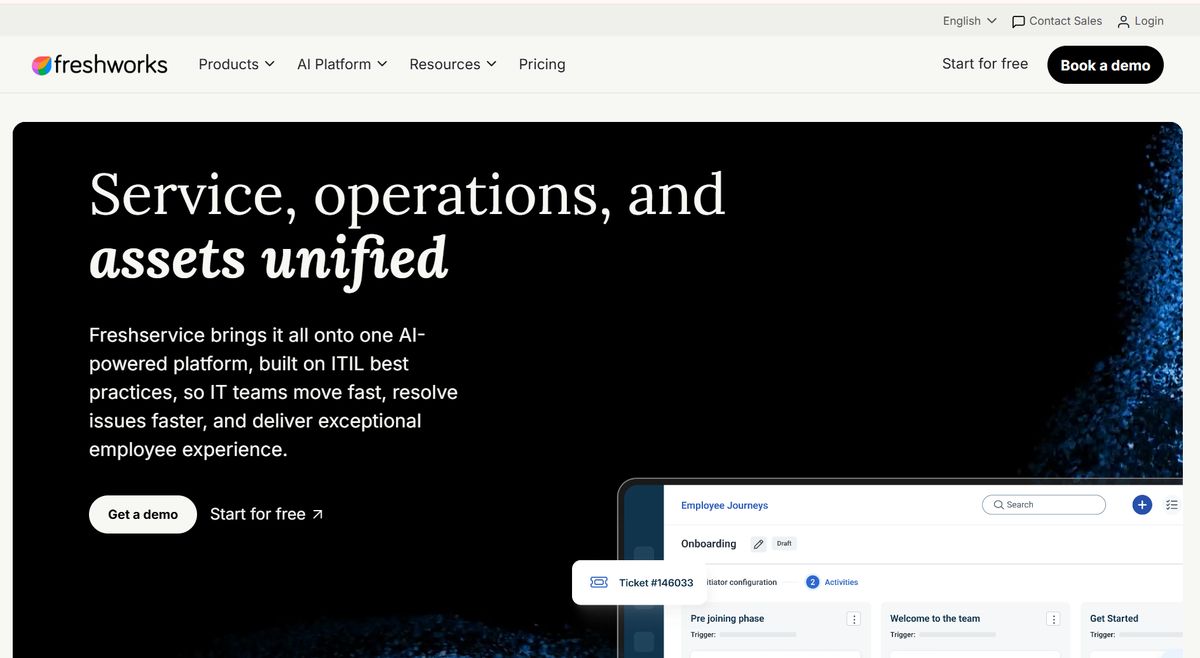
Freshservice is a quick-to-deploy ITSM product with asset management built in. List prices are $19 (Starter), $49 (Growth) and $99 (Pro) per agent per month, with 100 asset units included and extra units sold in 500-unit packs; Freshworks does not publish the pack price, and a server or VM counts as four units.
Where it falls short: it is SaaS only, which rules it out for air-gapped networks. Change and problem management require Pro, and Freddy AI Copilot is a $29-per-agent add-on. For five agents and 1,000 devices on Growth, seats alone come to $2,940 a year before the asset packs needed above 100 units, so get the pack price in writing.
InvGate Asset Management: best per-device pricing for fast rollouts
InvGate prices its asset product by device: Starter is $1,499 a year for up to 500 IP devices, and Pro is $5 per IP device per year, starting at $2,500. It offers agent and network discovery; on-premises hosting is limited to the Enterprise plan, which starts at $12,000 a year.
Where it falls short: the service desk is a separate product with its own per-agent license, which means two contracts to negotiate and renew.
Ivanti Neurons for ITAM: best for security-led teams already on Ivanti
Ivanti Neurons for ITAM combines discovery and normalization across endpoints, servers and cloud with license optimization and vendor-contract tracking. It works best where Ivanti endpoint management and patching already run, so asset, vulnerability and patch data share one source.
Where it falls short: pricing is quote-only and modular, and much of the value depends on owning the rest of the Ivanti stack.
Snipe-IT: best free option for barcode-based hardware tracking
Snipe-IT is open source under AGPLv3 and free to self-host with unlimited assets and users; hosted plans start at $39.99 a month. It handles QR and barcode labels, check-in and check-out, depreciation, license seats, LDAP sync and SAML SSO.
Where it falls short: there is no discovery and no ticketing, so every record is typed, imported or pushed through the API. Self-hosters also own the patch cycle, and several security fixes shipped in 2025.
What ITAM software costs for a 5-technician, 1,000-device team
Vendors meter different things, so the table fixes one mid-market shape: five technicians, 1,000 devices, annual billing, no discounts.
| Option | Annual list math | Annual cost | Not included |
|---|---|---|---|
| Alloy Navigator Express | 5 techs × $49 × 12 | $2,940 | Audit licenses for auto-discovered PCs; hosting if SaaS |
| Alloy Navigator Enterprise | 5 techs × $89 × 12 | $5,340 | Same as Express |
| Freshservice Growth | 5 × $49 × 12, plus asset packs | $2,940 + asset packs | Change and problem management; AI Copilot |
| Freshservice Pro | 5 × $99 × 12, plus asset packs | $5,940 + asset packs | AI Copilot ($1,740 for five agents) |
| Lansweeper Starter | $239 × 12 | $2,868 | Any service desk |
| InvGate Asset Management Pro | 1,000 devices × $5 (Starter stops at 500) | $5,000 | Service desk (separate license) |
| Snipe-IT Small Business hosting | $99.99 × 12 | $1,200 | Discovery and ticketing |
| ServiceNow Foundation | Quote only | Small teams from about $12,000 | Discovery (ITOM Advanced); implementation |
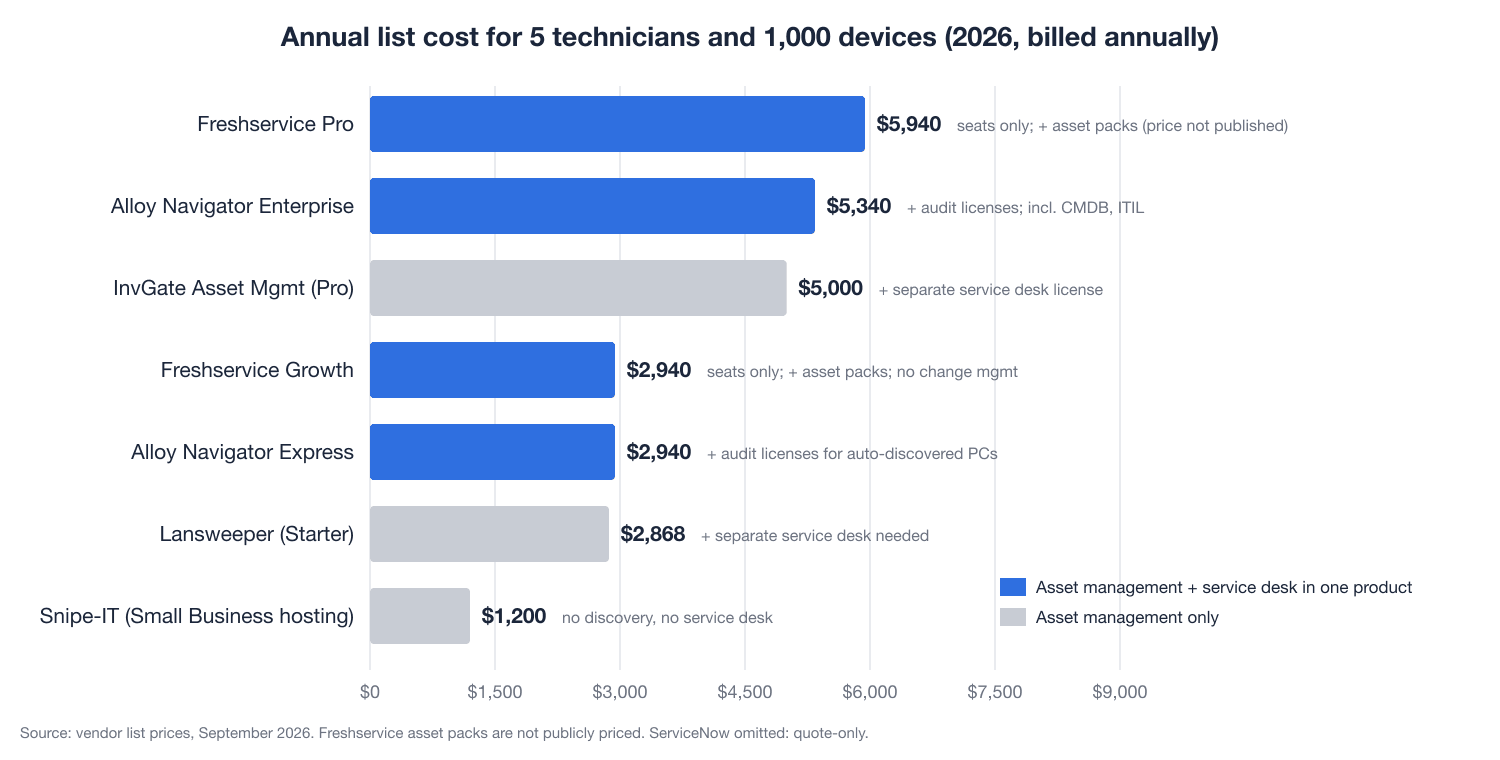
Two patterns stand out. Discovery-only tools are cheap per device, but you still need a service desk, and a second database breaks the link between a ticket and its device, which is what an auditor asks to see. Per-agent suites get expensive when devices outnumber technicians, because asset capacity is sold on top of seats.
Alloy's sales team adds that deals rarely stall because a quote is high; they stall because the budget was set before anyone researched the market.
Asset register or CMDB: which one you need
Every tool above keeps an asset register: what you own, who has it, what it cost. A CMDB adds configuration items and their relationships, which change management needs to predict impact; a laptop is both, a software license only an asset. Break-fix teams can live with the register alone. Teams with a formal change process need both in one system, and Alloy's breakdown ofITAM vs CMDB shows where they overlap.
How to choose ITAM software in a two-week pilot
A demo shows what the vendor wants you to see; a pilot on your network shows the data on day ten. Run your top two candidates in parallel:
- Count devices, technicians and sites, then divide devices by technicians. The ratio tells you which pricing meter costs less.
- Point discovery at one subnet and one cloud account for a week and compare the result with your spreadsheet, counting misses in both directions.
- Ask the vendor to create a new asset type live, such as an AI tool subscription with owner, renewal date and cost, add an approval step, and report on it. Note whether an engineer does it or it becomes a services quote.
- Re-enter 20 real tickets from last month and link each one to the affected device. Time it.
- Produce the last report your auditor requested, such as installed software by version and device, and time that too.
- Get the full quote in writing: seats, asset or audit licenses, hosting, training, minimum term and the format of a full data export at exit.
Hosting often narrows the field first. If policy requires on-premises deployment, Freshservice and Ivanti Neurons drop out, leaving Alloy, ManageEngine AssetExplorer, InvGate (Enterprise plan only) and, without discovery, self-hosted Snipe-IT.
Frequently asked questions
What is the best IT asset management software in 2026 for small businesses?
For one to three technicians who need discovery and a helpdesk, Alloy Navigator Explorer at $19 per technician per month covers both in one system. If you only need a hardware register with barcode labels and someone can maintain a server, self-hosted Snipe-IT costs nothing but staff time.
Is there free IT asset management software?
Yes, with limits. Lansweeper's free tier covers 100 assets, ManageEngine AssetExplorer's free edition covers 25, and Snipe-IT is free to self-host with no asset cap. None of them includes a service desk, and Snipe-IT has no automated discovery.
How long does ITAM software take to deploy?
Discovery-first tools such as Lansweeper can produce a usable inventory in one to two weeks. Mid-market suites typically need two to six weeks including workflow setup, and ServiceNow projects usually run three to six months. Most of that time goes into categories and data cleanup.
Where to start this quarter
If the October ESU invoice is the trigger, start with discovery. Removing 25 retired PCs from a year-two ESU order saves $3,050, more than a year of Navigator Express for five technicians. Among the best IT asset management software in 2026, Alloy Navigator with AlloyScan is the strongest fit for teams of 2 to 35 technicians that want discovery, the register and the service desk in one database with a choice of hosting. Whichever you pilot, re-run discovery after go-live and treat the second scan, not the project plan, as the measure of what was finished.
For MSPs and IT service firms, the same clarity applies to how you present your own services: eSEOspace builds websites and SEO for managed IT and MSP firms.
Put this into action with eSEOspace
We help businesses grow with website development that actually performs. Explore the services behind this guide:
Get a FREE Audit
We'll perform a comprehensive SEO, AEO, GEO & CRO audit of your website — completely free — and show you exactly how to outrank your competitors.
Don't have a site yet? Get in touch →
Get a FREE GEO/AEO/SEO Audit
We'll analyze your site's SEO, GEO, AEO & CRO — completely free — and show you exactly how to get found across Google and AI answers.
Don't have a site yet? Get in touch →
Great — your audit is on the way!
We'll send your free SEO/GEO/AEO/CRO audit within the next few hours. Where should we send it?
You're all set! ✓
Your free audit is being prepared — check your inbox in the next few hours. Talk soon!


On this page
- The best IT asset management software in 2026 at a glance
- How the tools were evaluated
- The 8 best IT asset management tools, reviewed
- What ITAM software costs for a 5-technician, 1,000-device team
- Asset register or CMDB: which one you need
- How to choose ITAM software in a two-week pilot
- Frequently asked questions
- Where to start this quarter






