
Disclosure: this is a guest article. For a full walk-through, see our website security checklist.
Millions of small businesses run websites, and those sites are constant targets for automated scanning scripts, credential stuffing bots, and opportunistic threat actors. A compromise does not require a targeted corporate espionage campaign.
Most web security failures happen because fundamental protections were omitted during site setup or neglected during routine maintenance. Protecting employee credentials and customer records requires establishing baseline defense layers across access control, data transmission, software updates, and exposure monitoring.
Image Source: Pixabay
Protecting Customer Data Through Web Infrastructure Basics
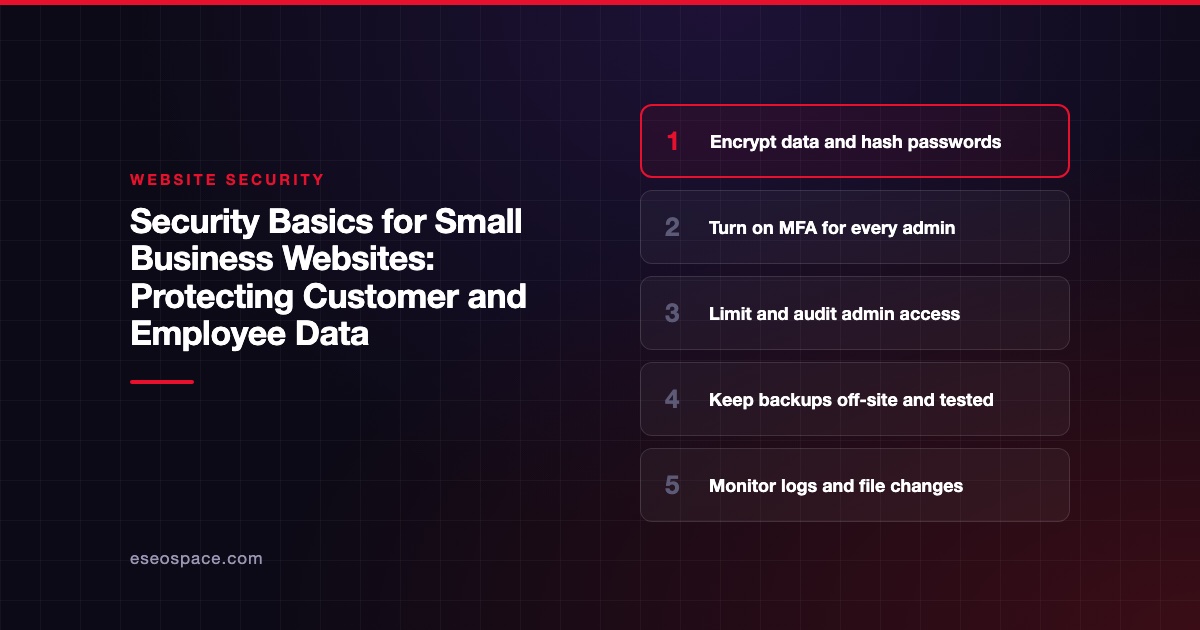
Securing customer data is important when budgeting for a website and it begins with encrypted transport and proper database hygiene. Every public-facing environment handling forms, user logins, or transaction processing requires HTTPS configured with modern TLS protocols. Without encrypted connections, user credentials and personally identifiable information (PII) travel across open networks in plain text, leaving them vulnerable to interception by basic packet-sniffing tools.
Beyond transport security, web applications must enforce strict data minimization principles. Storing unencrypted sensitive data in web application databases creates unnecessary liabilities.
Passwords must never exist in readable formats within any database; they should always be hashed using strong, salted algorithms such as Argon2 or bcrypt. When customer databases store payment information, shipping addresses, or contact details, access permissions should follow the principle of least privilege. Database service accounts require only the exact rights necessary to execute required queries, which helps keep a minor SQL injection vulnerability from escalating into full administrative database access.
Routine maintenance forms the backbone of web defense. CMS platforms, plugins, and third-party scripts are common entry points for automated attacks. Maintaining an automated patching schedule or applying security updates promptly after release helps prevent attackers from exploiting publicly known software vulnerabilities.
Managing Credentials and Mitigating Phishing Risks
Employee access points frequently represent the weakest link in small business cybersecurity. Weak, reused, or compromised passwords allow malicious actors to bypass technical security controls entirely. Establishing strong authentication policies across all administrative portals, hosting control panels, and content management systems is essential.
Credential reuse across personal and professional accounts exposes business infrastructure to cascading risk. When an employee reuses a password from a compromised third-party service, automated bots can quickly test those leaked credentials against popular platforms and login portals.
Credential stuffing attacks take little technical skill, because free software can send hundreds of login attempts at once. Implementing multi-factor authentication (MFA) correctly across every administrative account stops most of these attempts, ensuring a compromised password alone is insufficient for account takeover.
Employee email addresses published on contact pages or embedded in public domain registries often end up on target lists for spear-phishing campaigns. Attackers use these addresses to send targeted emails designed to steal credentials or trick staff into installing malware.
Running a regular digital footprint checker lets small business owners and administrators check whether an email address has appeared in data breaches or other leaks on the web and dark web. Knowing what's exposed lets administrators reset compromised passwords quickly and provide targeted phishing awareness training to staff whose contact details are widely exposed.
Implementing Practical Administrative Access Controls
Restricting access to internal administrative tools significantly shrinks a website's attack surface. Default login URLs for content management systems are well known to automated scanners and brute-force tools. Moving the login path cuts down on bulk automated scans, and restricting backend access to specific IP addresses keeps them from reaching login forms at all.
The same guardrails also keep social listening checks and inbox permissions tidy when teams publish across Facebook, Instagram, LinkedIn, and X.
Effective internal user management requires strict role delegation and routine access audits:
- Assign user accounts the absolute minimum privileges required for daily operational tasks
- Deactivate employee administrative access immediately upon offboarding or role changes
- Audit active administrative users quarterly to remove inactive or redundant accounts
In addition to user access controls, implementing a Web Application Firewall (WAF) provides real-time protection by filtering incoming HTTP traffic. A properly configured WAF can block malicious traffic such as cross-site scripting (XSS), SQL injection, and brute-force attempts before they reach the web server.
Building Resilient Backup and Monitoring Strategies
Even robust security controls cannot guarantee absolute protection against every emerging threat. A resilient recovery plan helps ensure a security incident does not cause permanent data loss or extended business downtime.
Reliable backup routines require off-site storage that remains completely isolated from the primary web hosting server. If an attacker gains full access to the hosting environment, they can modify, encrypt, or delete local backups stored on the same server.
Regular backup testing is just as critical as the automated backup generation process itself. Small businesses should regularly test restoring their site from off-site backups to verify data integrity and confirm recovery timelines.
Continuous monitoring and logging provide visibility into ongoing site health. Enabling detailed server logs, tracking file modification dates, and configuring file integrity monitoring tools help administrators detect unauthorized changes early.
Identifying anomalous activity early minimizes overall impact, protects customer trust, and keeps operational systems online. Explore our blog for guides on securing server environments, configuring firewalls, and much more.